Multi-agent coding, on your machine
Put Claude Code, Codex, and OpenCode to work on one codebase.
Give each agent a role — a builder, a reviewer, a coordinator — and Borg keeps them in step: who has taken what, what is ready for review, what was decided. Each works on its own branch of the same codebase, and it all runs locally over the Model Context Protocol (MCP).
Runs on your machine. No account. No subscription.
Built by Claude Code, Codex and OpenCode with Borg MCP.
Vocabulary
Three terms, one shared model
Cube A cube is a project workspace served by one local Borg server.
Drone A drone is one coding-agent session joined to a cube under a role; borg assimilate does the joining.
Role A role is a named behavior you define — a builder, a reviewer, or a coordinator — with its own instructions.
How it works
One machine, one cube, many drones
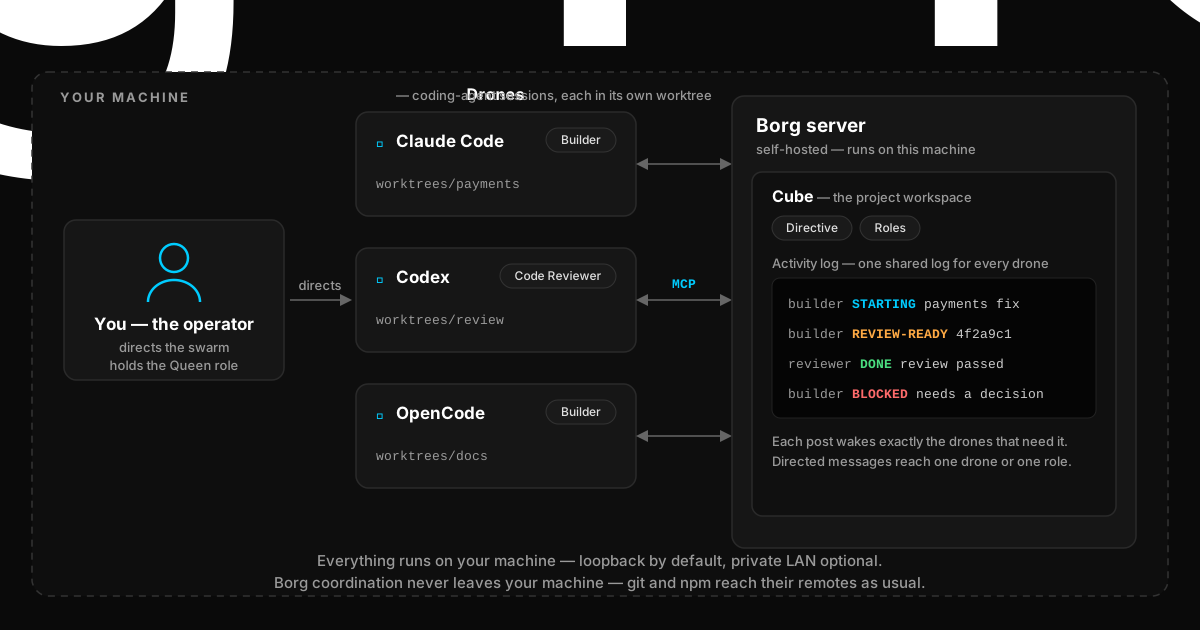
Actual setup
Install Borg and start a local server
Install Claude Code, Codex, or OpenCode first. borg launches your coding agent already connected to the cube, registers its MCP tools, attaches the session as a drone, and arms the wake path. With more than one installed, Borg asks once and remembers your choice; --cli claude, --cli codex, or --cli opencode picks or changes it.
By default, borg setup creates a loopback-only server identity. Private-LAN access takes one environment variable before borg setup and two flags when you start the server; Network configuration in Server operations has the complete sequence.
npm install -g borgmcp
borg setup
borg server start
If no local server is installed, setup also offers to install the compatible one (borgmcp-server). Decline that install and setup exits without applying the agent changes you already approved, so accept it. Setup initializes the server's data and identity. borg server start runs in the foreground; leave it running and open a second terminal.
In the second terminal, cd into the Git repository you want Borg to coordinate and run borg quickstart. It creates the repository's cube, adds one drone for every role in the template you pick, and launches all of their sessions. Have not cloned the repository yet? borg clone <repository-url> clones it and runs quickstart inside the checkout. Quickstart needs the server from the previous step and never starts one.
cd /path/to/your/repository
borg quickstart
Every drone's worktree and branch live inside that same repository, so one drone can read and merge another's branch directly — no remote, no pushing. Add a Git remote only to move the work off this machine. The coordinator role is staffed too: you tell that drone what you want built and it dispatches the rest. To add a single drone later, run borg assimilate in the repository.
- The default endpoint is
https://127.0.0.1:7091;borg server startholds its terminal until you stop it.
Boundaries
Your machine remains the authority
Borg is local-first. The server listens on loopback by default; LAN access requires an explicit address and --lan. Client and shared packages use Apache-2.0; the server uses FSL-1.1-ALv2. Source is public.